


The best ecommerce website builder is Wix, providing users with an intuitive yet highly customizable online store building interface. It handles everything, including store creation, email marketing, and inventory management. Plus, Wix comes with expert 24/7 support, so you can get some guidance on how to build an online store the right way.
There are lots of ecommerce website builders out there that can help you sell online, though, and each one offers different features, functionalities, and price points that are aimed at specific businesses. Subsequently, you’ll want to make sure you find the right one.
Luckily, in this guide, we’ve done the heavy lifting for you by researching these platforms and providing some helpful insight into which ecommerce website builders are best for specific businesses. Our recommendations are based on our most recent round of ecommerce website builder testing, which occurred in 2025.
Key Takeaways
- We’ve rated Wix the top ecommerce website builders for small businesses, thanks to its excellent all-round functionality, store management tools, and time-saving AI website builder.
- Squarespace is a solid option for marketing features, with features such as integrated email marketing. It also had the most stunning website templates, a key driver for helping your brand stand out.
- Shopify is the best choice for larger ecommerce businesses because of strong sales functionality, including the option to support an unlimited number of products. Its transaction fees and integration options, however, make it a more expensive option.
- GoDaddy and Hostinger are best for businesses wanting to save costs, with businesses having the opportunity to get up and running with Hostinger for as little as $2.99 month, if you take advantage of current deals.
- All of our recommendations are based on rigorous research and first-hand testing conducted in 2025.
| Price The most affordable plan that offers ecommerce functionality | Staff accounts | Products | Multi-currency display | App market | POS compatibility | Checkout customization | Multi-location inventory | ||
|---|---|---|---|---|---|---|---|---|---|
| BEST OVERALL  |  |  |  |  | |||||
| Up to 15 | Unlimited | Up to 15 | 1 | 1 | |||||
| 50,000 | Unlimited | Unlimited | 1,000 | Unlimited | |||||
| 35+ | 100+ | 130+ | 75+ | 50+ | |||||
| | | | | | |||||
| Add-on | Square integration | | | | |||||
| | | | | | |||||
| | Add-on | | | |
Top Ecommerce Website Builders
We put each ecommerce website builder through rigorous testing and an analysis program to cut the wheat from the chaff. Based on our thorough tests, these are our favorite ecommerce website builders:
- Wix – Best for smaller ecommerce ventures
- Squarespace – Best for marketing features
- Shopify – Best for larger ecommerce businesses
- Hostinger – Best for businesses on a budget
- GoDaddy – Best value for money
Note: the links above will take you directly to each provider or to our comparison tool, where you can get a tailored quote for your business.
1. Wix — Best for Smaller Ecommerce Ventures
Wix is the best ecommerce website builder for smaller businesses that want to get up and running with an online store quickly, particularly because of its all-in-one ecommerce management interface that includes built-in marketing and sales tools.
Likewise, Wix’s AI website builder generated a website for us in under a minute when testing, making it perfect for a rapid setup. Better yet, Wix’s new vibe coding platform, Wix Harmony, will create a site for you based on a single prompt, and you’ll be able to make changes as you go by simply conversing with the AI assistant. This makes it even quicker at building a fully functioning site.

Pros
- Customizable AI chatbot builder
- Email marketing that matches site theme
- 24/7 expert support across all parts of site creation platform
- AI image generator and advanced editing tools
Cons
- Expensive processing fees compared with other builders
- Vast design functionality is intimidating for beginners
- Inability to change site theme after publishing
- AI can be repetitive and inaccurate
- Free version available

- Light: $17/month
- Core: $29/month
- Business: $39/month
- Business Elite: $159/month
- Free domain with 1-yr contract
Testing Notes: Wix
As soon as I opened up Wix, I was invited to interact with its AI website builder to get my site up and running.
From this initial conversation, I was impressed with how Wix tailored itself to the preferences of my site. I told it I wanted to sell, and it set me up with ecommerce apps and marketing tools. Plus, it showed me which social platforms would be best suited for reaching my target audience, and added them to my dashboard.
This would definitely save a wealth of time for businesses that don’t want the hassle of slowly modifying a platform until it works for them.

What are Wix’s strengths?
- Payment integrations: In addition to Wix Payments, the ecommerce website builder integrates with 80+ third party payment options, including Stripe, PayPal, Apple Pay, and Google Pay.
- Mobile functionality: The Wix Owner App allows users to manage inventory and track sales data from their phone, which means you can manage your store on-the-go, wherever you are.
- Native app builder: Our research shows that Wix provides users with a built-in app builder that can help your online store cater specifically to mobile buyers.
- Back-in-stock notifications: Wix allows users to create back-in-stock alerts for customers on the waitlist for certain products, so they can get informed as soon as they are available to buy again.
- AI tools: We just needed to answer a few questions from Wix’s AI website builder before it generated our site, which was ready to go in under a minute when we tested it. From here, you can fine-tune your site using Wix’s other range of AI tools, including a headline and content writer, and AI guided SEO support.

The Wix analytics dashboard provided us with lots of information about our online store. Source: Tech.co testing
What are Wix’s weaknesses?
- Limited products: One major downside of Wix is that it only allows you to sell a maximum of 50,000 products, while we found other ecommerce website builders, like Shopify, allow for unlimited products.
- Limited template flexibility: You’re unable to switch once you’ve chosen the website template you’re going to use in Wix, which is frustrating if you end up changing your mind. This can also make for a stressful pre-launch experience if you aren’t confident about your design.
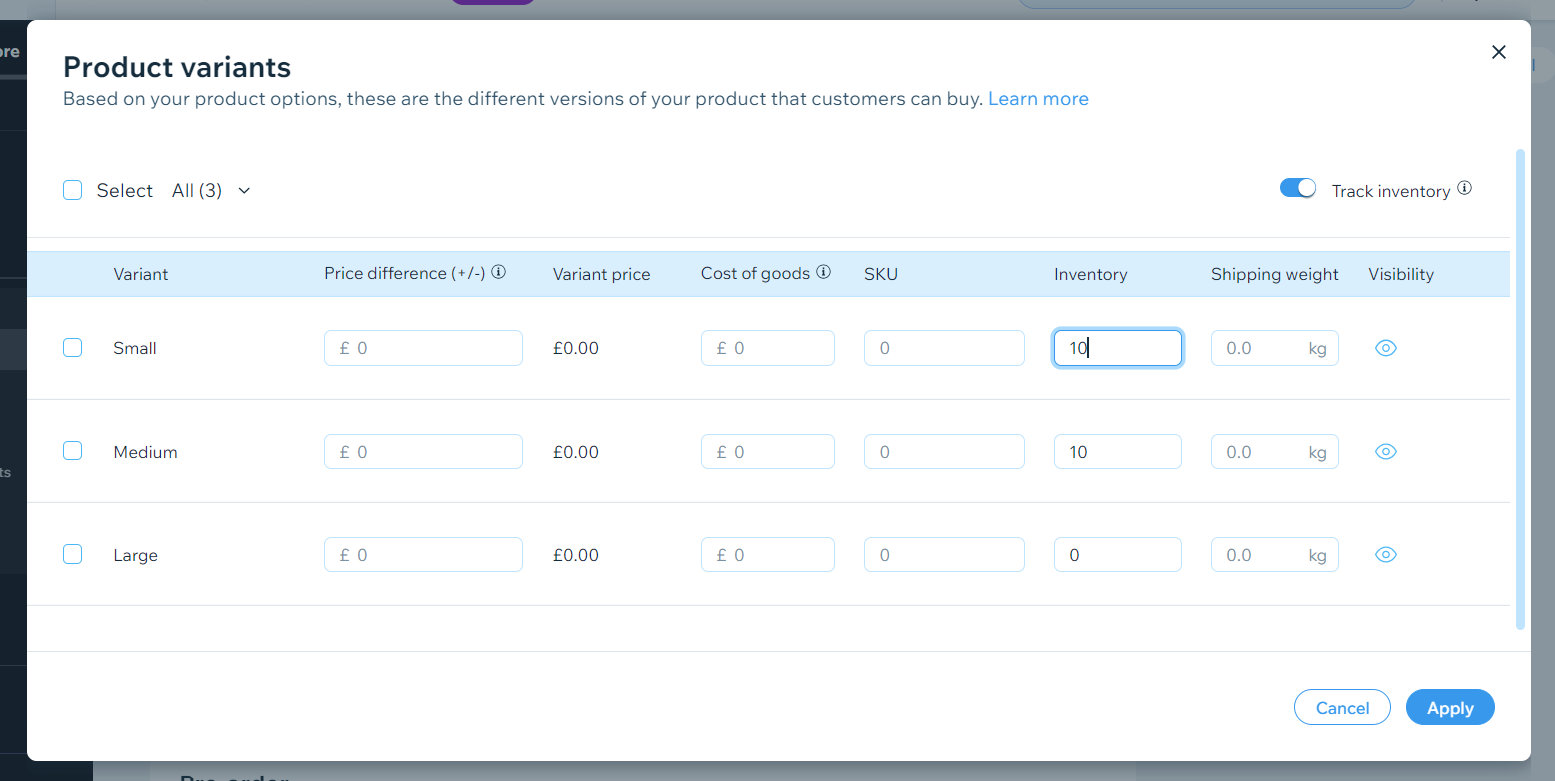
We were able to create product variants easily and track their stock effectively. Source: Tech.co testing
How much does Wix ecommerce cost?
Wix pricing starts at $17 per month, but that plan does not offer ecommerce functionality. The popular website builder offers three pricing plans that allow you to build an online store, each with an increasing number of ecommerce features to improve the experience.
- Core – $29 per month
- Business – $39 per month
- Enterprise – $159 per month
Overall, Wix offers competitive pricing, although the $159 per month Business Elite plan certainly sets the bar a little high, compared with other competitors on this list. Only Shopify has a more expensive plan, the $299 Advanced plan, and it offers far more sales functionality.
The $29 per month Core plan and the $39 per month Business plan, though, are fairly standard for the industry and provide a robust set of sales and website builder features for your business.
It’s worth remembering that no matter how much you pay for Wix, you’ll be limited to only 50,000 products, whereas Shopify and Squarespace offer unlimited products.
Any hidden fees?
Like pretty much all ecommerce builders, Wix charges processing fees via its payment provider, Wix Payments, whenever your customers make purchases on your website. The default fee for US purchases is 2.9% + 30¢, although you should check out Wix’s website if your business handles international payments.
Check out our Wix pricing guide for more information, or check out the pricing table below:
2. Squarespace — Best for Marketing Features
Squarespace is great for ecommerce businesses that want to elevate their brand and reach their customers, thanks to its suite of marketing and sales features, including deeply integrated email marketing that helps you keep brand consistency across your website and campaigns.
Likewise, Squarespace offers some of the most beautiful and customizable templates we’ve ever used. These will give your business the opportunity to become instantly recognizable as a major player in a crowded industry, boosting conversion.

Pros
- AI site builder with flexible design controls
- Easiest to use interface for beginners across research
- Customizable checkout page with branding and guest checkout
- Some of the most stylish templates in the industry
Cons
- POS system is currently exclusive to the US
- Sorting and filtering of products requires add-on
- Not ideal for larger ecommerce stores
- No inventory reports available
- Basic: $16/month
- Core: $23/month
- Plus: $39/month
- Advanced: $99/month
- No transaction fees
- 14-day Free Trial
Testing Notes: Squarespace
What stuck out to me the most when I tested Squarespace was how good-looking the website it generated for me was.
Like Wix, I just had to answer a few questions about my site to get started. It actually took less time for Squarespace to create a website for me than Wix, and a better looking one at that.
What are Squarespace’s strengths?
- Unlimited products: Our research shows that Squarespace offers unlimited products, services, and digital assets across all paid plans.
- Custom inventory management: Squarespace offers access to an open API for inventory, allowing you to fully customize how you keep track of your products.
- Advanced shipping: Real-time shipping rates based on location and shipping carrier are available to the customer at checkout with Squarespace, offering accurate and personalized rates.
- POS functionality: Squarespace integrates with Square POS, so you can easily combine your online and in-person store information.
- Payment integrations: Squarespace only offers payment integrations with Stripe and PayPal, as well as its own branded Squarespace Payments service.
- AI tools: Squarespace has an AI website builder that generated us a site in under thirty seconds, which is great for businesses that want to get started quickly with a first draft. Squarespace also has AI tools that can write content, articles, and headlines, as well as SEO site descriptions, and client and project proposals.
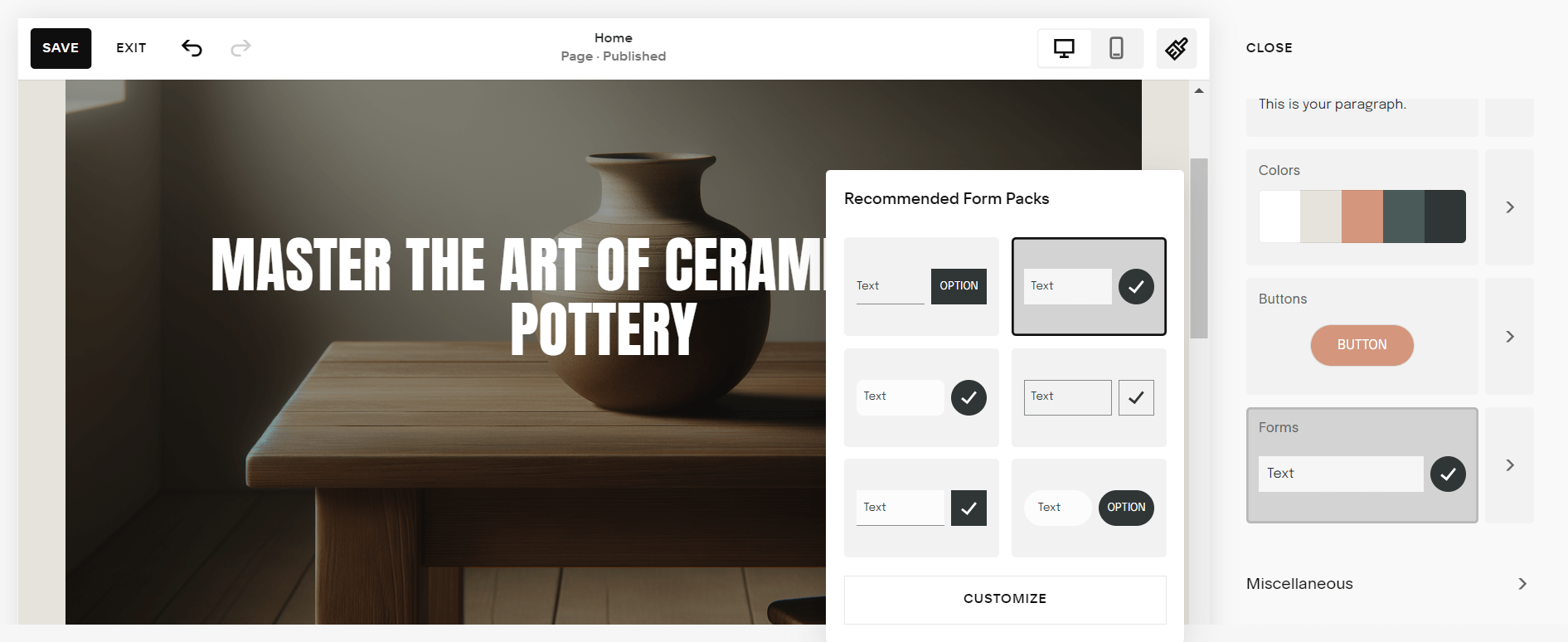
Squarespace lets me customize the font and color scheme of my template in a couple of clicks. Source: Tech.co testing
What are Squarespace’s weaknesses?
- Limited inventory management: Squarespace is lacking when compared with options like Shopify, that offer customer wish list options and product bundles.
- Struggles with large quantities of stock: Squarespace lacks advanced options, like multi-location tracking, as a native feature, meaning larger businesses moving large quantities of stock would struggle. We’d recommend Squarespace more for businesses selling digital items, like event tickets, because this kind of feature is built into the platform.
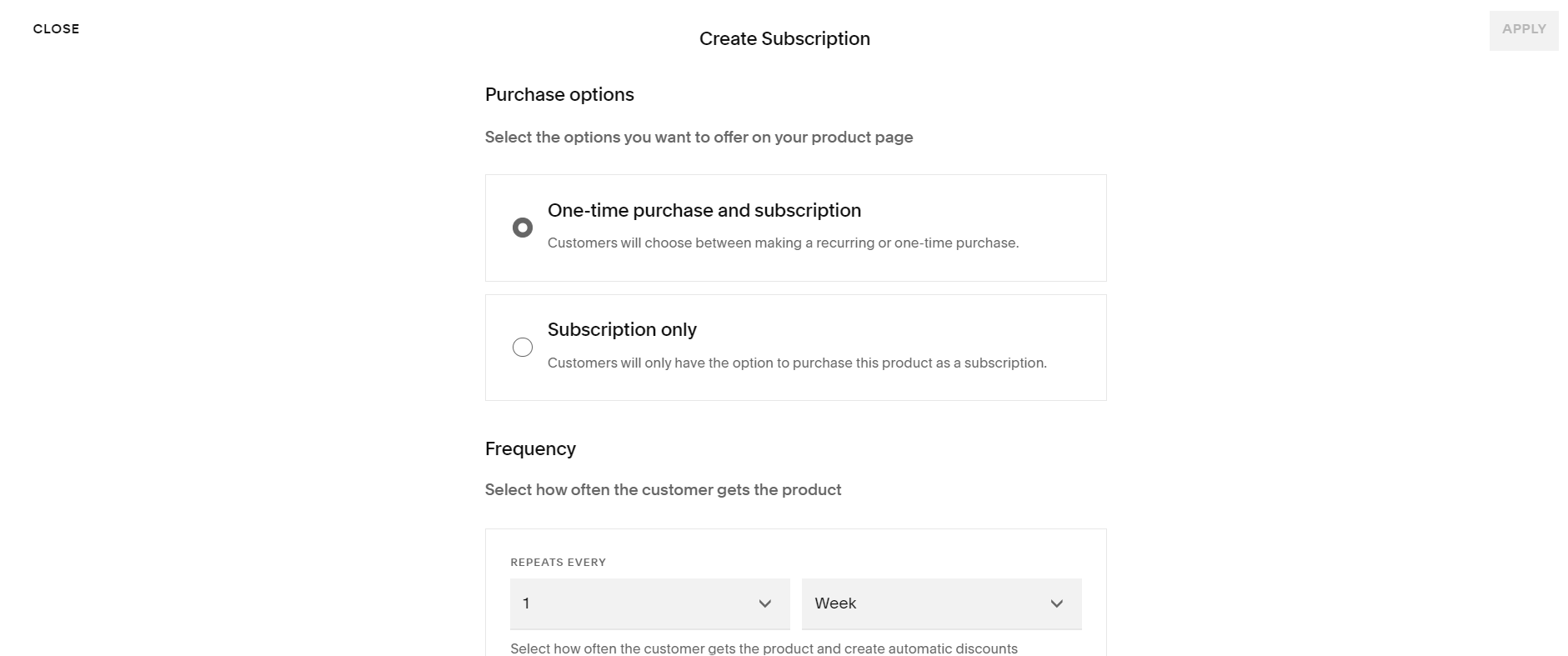
Squarespace gave me a choice between one-time purchase subscriptions and just subscriptions, and also let me choose their frequency. Source: Tech.co testing
How much does Squarespace cost?
Squarespace is one of the few website builders that allows ecommerce functionality across all its pricing plans. There are four different options to choose from.
- Basic – $16 per month
- Core – $23 per month
- Plus – $39 per month
- Advanced – $99 per month
Squarespace is an excellent value pick, with comparatively low pricing plans with a lot of functionality.
Any hidden fees?
Squarespace charges transaction fees across all plans:
- Basic – 2.9% + 30¢
- Core – 2.9% + 30¢
- Plus – 2.7% + 30¢
- Advanced – 2.5% + 30¢
Likewise, if you’re on the Basic plan, it’s important to note that Squarespace will also take 2% of the total sale amount for each completed transaction. This isn’t an issue on other plans.
Want to know more? Read our full Squarespace for ecommerce review, or check out the pricing table below:
3. Shopify — Best for Larger Ecommerce Businesses
Shopify’s robust set of sales features — the most out of all the providers we tested — makes it a solid option for larger ecommerce businesses that want a platform readily able to handle its complex operations. These features include strong inventory management and shipping options, as well as the ability for businesses to sell unlimited products in their online store.
Check out our Shopify POS review for more information.

Pros
- Add unlimited products with your own CSV
- Customizable member areas
- Intuitive product-adding experience for beginners
- AI site builder can have you live in seconds
Cons
- Monthly fees for POS system integration
- Scheduling and booking requires add-on
- No tutorials for setup, so tough for beginners
- Limited SEO settings available
- Basic Plan: $29/month
- Grow Plan: $79/month
- Advanced Plan: $299/month
Testing Notes: Shopify
Shopify, in my opinion, has one of the strongest lineups of AI tools within an ecommerce builder. Not only is there a site builder, but Shopify’s AI assistant Sidekick can help with organizing and analyzing real-time data, which is a massive time-saver for businesses.
However, I did struggle to find and access these tools on occasion, and felt they could have been more visible on the platform.
What are Shopify’s strengths?
- Unlimited products: Shopify allows users to sell unlimited products in their online store across every single paid plan available, which we believe makes it perfect for larger businesses.
- Staff accounts: Shopify offers additional accounts in its more expensive paid plans, including up to 15 staff members with the Advanced plan.
- POS functionality: Shopify offers a branded POS system, including card readers and full-on terminals, to help you combine online and in-person selling efforts.
- Analytics: Shopify offers robust analytics, including access to more than 60 reports to track your store performance, and custom reporting tools available for all users.
- AI tools: Shopify’s AI site builder took less than thirty seconds to generate us a site during our tests. Likewise, Shopify’s AI assistant, Sidekick, acts like a consultant on your team, with the ability to analyze data and operations in real time. There is also Shopify Magic, that can help with writing product descriptions, email campaigns, and refine images. Plus, Shopify Flow is able to automate tasks for users, saving valuable time and maximizing efficiency. Overall, we found a wealth of AI options for Shopify users in our tests.

Shopify offers tons of top-tier marketing features. We found its AI-generated email marketing tool to be a great way to drum up brand awareness quickly. Source: Tech.co testing
What are Shopify’s weaknesses?
- Lack of functionality: One person who took part in our user testing described Shopify as the “inverse of Wix,” with a heavy emphasis on the management of inventory and sales channels integrations, rather than the actual design of the site.
- Limited design interface: Shopify is less customizable than other options on this list, with a drag-and-drop editor that can change full sections rather than every small detail. This could be a challenge for businesses who are looking to effectively design their platform to their own unique standards.
- Expensive: Shopify is more expensive than most other providers on this list. Its cheapest ecommerce plan might only come in at $29 per month, but a lack of built-in apps available right out of the gate means users will have to invest in the provider’s app library to use basic ecommerce features. The transaction fees the provider charges when you don’t use Shopify Payments can range from 0.5% to 2%, which further adds to the lack of affordability, particularly in a marketplace where competitors like Wix and Squarespace don’t enforce any.
Check out our Wix vs Shopify guide for more information on our top two ecommerce builders.
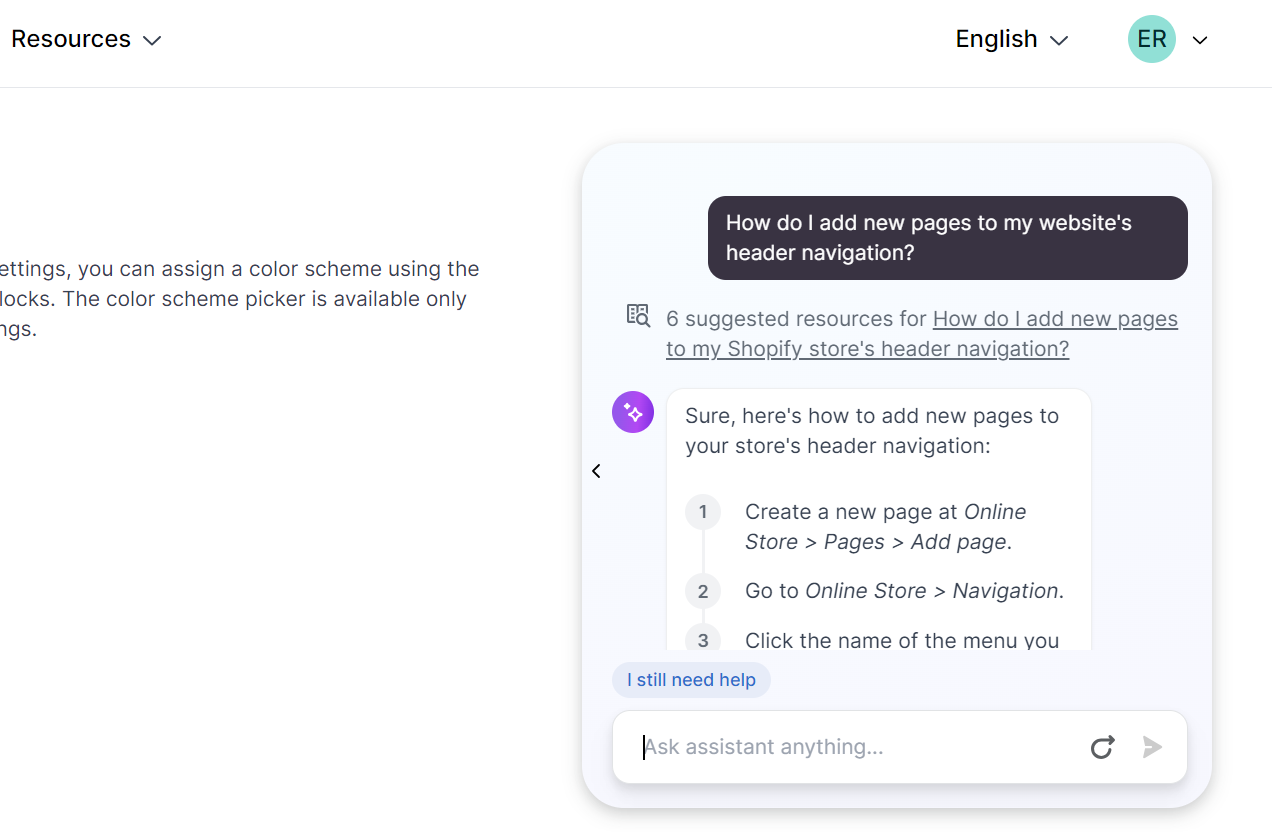
The help assistant in Shopify provides us with step-by-step instructions to solve our issues. Source: Tech.co testing
How much does Shopify cost?
Shopify offers three different pricing plans that allow you to sell products online. The ecommerce website builder also offers a special deal for all three plans that allows you access to the platform for $1 per month for the first three months.
- Basic – $29 per month
- Grow – $79 per month
- Advanced – $299 per month
Shopify also offers a very expensive Plus plan that costs $2,300 per month for large businesses, and requires at least a one-year commitment, so you’ll be shelling out the big bucks for this very advanced plan.
Finally, it’s worth mentioning Shopify POS, which is software that can be used for in-person sales and also integrates with Shopify’s ecommerce and payments services.
Any hidden fees?
Shopify charges transaction fees just like Wix and Squarespace, and the higher your plan, the lower your transaction fees will be. Plus, Shopify also charges a fee when a customer pays via its payment provider, Shopify Payments. You can see how these stack up in the table below.
Included in your plan is also a fee for a custom domain name, and the price of this will vary based on the specifics of your site. You may also have to pay additional email fees for Shopify Email marketing, and integrated shipping and tax solution fees.
Check out our Shopify POS pricing guide for details on its costs.
4. Hostinger — Best for Businesses on a Budget
Hostinger offers some of the best in the industry, with an ecommerce plan that’s half the price of Wix’s.
In the process, it still offers a strong set of features. Therefore, it’s a great choice for businesses that are looking to save on an ecommerce builder, but don’t want to sacrifice some of the top features, such as AI tools that allowed us to get our site live as fast as possible.
Check out our Hostinger review for more information.

Pros
- Fastest site loading across research
- No transaction fees for selling products
- Most affordable website builder with special deals
- AI site theme builder for fast website setup
Cons
- Limited booking and scheduling tools
- No integrations with eBay, Amazon, or social media
- No POS compatibility
- No mobile app to manage your store on the go
- 30-day money back guarantee
- Renewal price from $6.99/month
- Up to 10% off (deal active now)
- Standard price: $11.99/month
- Free 1 year of 1 domain included with plan
Testing Notes: Hostinger
The best thing about Hostinger is it’s price. Frequent deals on the provider mean you can snatch its Business plan for as little as $2.99 per month.
At that price, you’ll be able to access a wealth of AI tools, including an AI WordPress site builder.
Ultimately, I’d recommend Hostinger for businesses that want to utilize an AI-driven ecommerce solution, while paying very little in monthly fees and nothing in transaction fees.
What are Hostinger’s strengths?
- Transaction fees: Users pay 0% transaction fees on sales with Hostinger, which can be a huge boon when trying to keep costs low. Compared to the other providers we tested, this could be a huge boost for businesses with a high turnover rate.
- PWYW functionality: Hostinger provides infrastructure in the platform to implement a Pay What You Want (PWYW) campaign for customers to encourage sales, no matter the cost.
- Custom merch: A built-in Printful integration means you can create and sell custom products directly from one platform when using Hostinger.
- Site speed: Hostinger scored the highest in our site speed tests across both desktop and mobile, beating the likes of Wix and GoDaddy. For businesses that want to quickly create their site without being dampened by wait times, Hostinger is a great choice.
- Link in bio: Hostinger provides a handy linking tool that makes it easy to share your store on social media, websites, and other platforms. This will no doubt be highly beneficial for brands looking to maximize their visibility.
- AI tools: Hostinger offers an AI-powered drag-and-drop website builder, where you just need to describe your business to get a complete site structure. During testing, it took less than thirty seconds for our page to be generated. AI will continue to make suggestions on improvements as you edit your page. There are also built-in AI tools for generating headlines, product descriptions, custom images, and SEO assistance.